
The Masking tab in the Workspace Settings window allows you to configure and manage masks. Masks are used to hide or exclude specific areas of the display canvas or screen, for example to cut out the region of a door in the room or temporarily hide the floor region while a session is in use.
Masks
-
Each workspace can contain one or more masks
-
Masks may come from two sources:
-
Mask from Igloo Setup: Masks created in Igloo Setup and imported into the Core Engine. Requires Igloo Setup version 2.5.0+
-
Mask from Region: Masks generated automatically from regions in your available Layouts & Regions. See - Layouts & Regions Window
-
You can add, enable, disable, and remove masks through this interface.
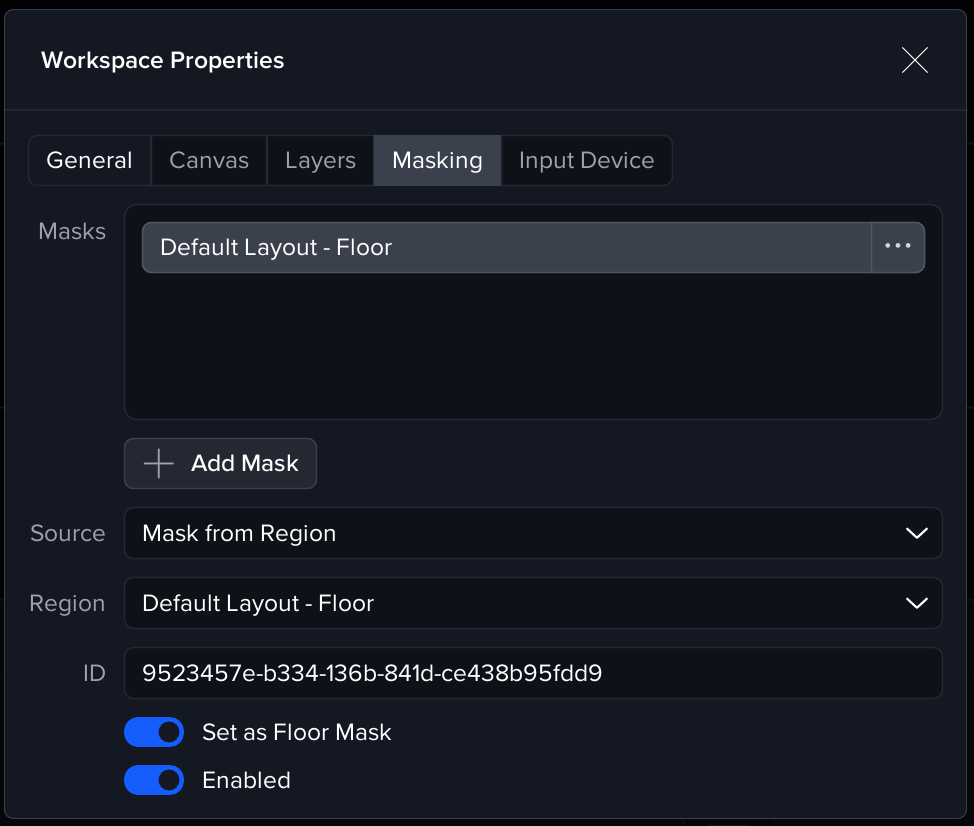
Mask properties:
Enabled
The Enabled toggle determines whether the selected mask is currently applied. Disabled masks remain stored but are not rendered.
Mask ID
Every mask has a unique ID, which can be used to control the mask via the Igloo API
Floor Mask
The Set as Floor Mask option designates a mask as the floor mask.
-
Only one mask can be marked as the floor mask at a time.
-
The floor mask is most commonly used to hide the floor region of immersive room or cylinder + floor system, allowing content to display only on the walls.
Triggers and Actions
The masking system integrates with the Triggers and Actions
-
An action is available for Enabling or Disabling the Floor Mask.
-
This is commonly used when loading or closing a session:
-
On session load, you may want to enable the floor mask to hide the floor region.
-
On session close, you may want to disable it to return to an unobstructed view.
-
Typical Workflow
-
Open the Masking tab under Workspace Properties.
-
Click Add Mask to insert a new mask.
-
Choose the Source (Igloo Setup or Region).
-
If the mask represents the floor, toggle Set as Floor Mask.
-
Enable or disable the mask as required, or automate this via Triggers and Actions.